
Service Help – Dashboard
The Sharperlight service offers a wide variety of presentation methods, each with its own set of parameters.
In this post, we will introduce the following method from among the various presentation methods available.
http://abcd.com/mdService1Rest/Dashboard/…
Dashboard
To see this information with your sharperlight service help
{sharperlight service url}/Help#Dashboard
{sharperlight service url}/Help#Dashboard
| type=[gauge1..(n)] | The type of gauge or object to be displayed. Most types share a common set of parameters but some may have unique parameters. e.g &type=gauge |
| height=[1..(n)px] | control height in pixels. Defaults do exist for each control type e.g. &height=100 |
| width=[1..(n)px] | control width in pixels. Defaults do exist for each control type e.g. &width=200 |
| title=[text] | Title of control if applicable |
| titleColor=[color|#htmlColor] | Set the Title font color &titleColor=red &titleColor=#002ab3 |
| titleSize=[7..(n)] | Set the Title font size. If not set then the font size is auto determined. e.g. &titleSize=12 it is also possible to use &fontSize=12 |
| fontSize=[7..(n)] | Set the general font size. If not set then the font size is auto determined. e.g. &fontSize=12 |
| title2=[text] | Sub Title of control if applicable. In the case of a radial gauge this will be the label at the bottom |
| title2Color=[color|#htmlColor] | Set the Sub Title font color e.g. &title2Color=red &title2Color=#002ab3 |
| title2Size=[7..(n)] | Set the Sub Title font size. If not set then the font size is auto determined. e.g. &title2Size=12 |
| value=[(n)] | control value. This parameter should always be set |
| value2=[(n)] | control second value where applicable |
| min=[(n)] | Scale minimum value where applicable. Defaults to 0 if not set e.g. &min=0&max=100 |
| max=[(n)] | Scale maximum value where applicable. Defaults to 100 if not set. e.g. &min=-5000&max=5000 |
| ticks=[0..(n)] | The number of ticks to appear on the scale. e.g. &ticks=5 |
| tickFormat=[.NET format] |
Some types allow the numbers that appear on the scale to be formatted using .NET formating e.g. &tickFormat=N2 displays 5123.78 as 5,123.78 and &tickFormat=P0 displays 0.75 as 75% and &tickFormat=K displays 120 as 120K |
| greyZoneColor=[color|#htmlColor] |
If the type supports zones like in a radial gauge then the grey zone is the first zone. Will default to blue, white or gray depending on the type. e.g &greyZoneColor=blue or &greyZoneColor=#7092ff |
| yellowzone=[(n)|((nP)] |
Set the start value of the yellow zone which can be a constant or a percentage of the max. Defaults to 0.7 (70%) and this only applies to certain controls e.g &yellowzone=50 It is possible to set the zone as a percentage of the max value by using P e.g. &yellowzone=70P will do 70% of max |
| redzone=[(n)|((nP)] |
Set the start value of the red zone which can be a constant or a percentage of the max. Defaults to 0.9 (90%) and this only applies to certain controls e.g &redzone=50 It is possible to set the zone as a percentage of the max value by using P e.g. &redzone=90P will do 90% of max |
| size=[1..(n)] |
The size will mean different things depending on the type. For example for type gauge it will be the size of the gauge band in pixels QR code size default is 120 |
| color=[htmlColor] | QR code color default is blank |
| backColor=[htmlColor] |
Set the background color of the control QR code back color default is transparent |
| pointerColor=[color|#htmlColor] | Set the color of the pointer niddle if the type has one. e.g. &pointerColor=red or &pointerColor=#002ab3 |
| correction=[L|M|Q|H] |
QR code error correction level default is M “L” – approximately 7% “M” – approximately 15% “Q” – approximately 25% “H” – approximately 30% |
| orientation=[horizontal|vertical] | orientation depends on the type of gauge for example gauge8 |
| borderWidth=[0..(n)] | QR code border width default is 2 |
| css=[CSS_Styling] |
Inject CSS styling into the gauge This is used for example to set the default print css styling @page etc. when using Chrome Headless in Scheduler e.g. &css=@page{size:A4 landscape; margin:auto;} &css=div{color:red;} &css=body{zoom:50%;} |
| type=gauge |
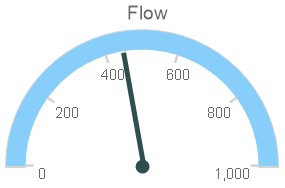
Radial Gauge (Returns PNG image)http://abcd.com/mdService1Rest/Dashboard/?type=gauge&title=Flow&value=450&max=1000
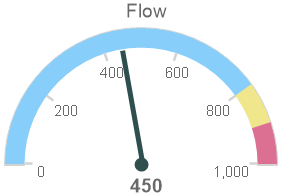
http://abcd.com/mdService1Rest/Dashboard/?type=gauge&title=Flow&value=450&min=0&max=1000&title2=N0&yellowzone=80P&redzone=90P
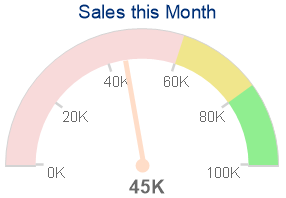
http://abcd.com/mdService1Rest/Dashboard/?type=gauge&title=Sales%20this%20Month&titleColor=darkblue&value=45&title2=45K&min=0&max=100&size=30&width=300&height=200&greyZoneColor=red&yellowzone=60P&redzone=80P&redZoneColor=lightgreen&pointerColor=orange&ticks=5&tickFormat=K
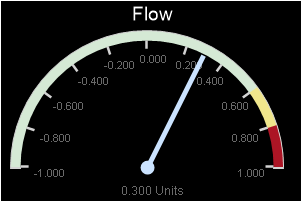
http://abcd.com/mdService1Rest/Dashboard/?type=gauge&title=Flow&value=0.30&title2=0.300%20Units&titleColor=white&title2Size=9&size=10&min=-1&max=1&width=300&height=200&greyZoneColor=green&yellowzone=60P&redzone=80P&redZoneColor=darkred&pointerColor=blue&ticks=10&tickFormat=N3&backColor=black
http://abcd.com/mdService1Rest/Dashboard/?type=gauge&title=Flow&value=450&title2=N0&max=1000&ticks=0&height=70&width=100

|
| type=gauge2 |
Gauge 2 (Internet Required)http://abcd.com/mdService1Rest/Dashboard/?type=gauge2&title=Flow&value=45&height=115&width=115
|
| type=gauge3 |
Radial Gauge 3 (Uses HTML5)http://abcd.com/mdService1Rest/Dashboard/?type=gauge3&min=0&max=100&ticks=10&value=45&title=Flow&pointerColor=darkorange&yellowZone=70&redZone=90&height=191&width=224
http://abcd.com/mdService1Rest/Dashboard/?type=gauge3&min=0&max=100&ticks=10&value=45&title=Flow&pointerColor=darkorange&yellowZone=70&redZone=90&height=220&width=220&greyZoneColor=green&yellowZoneColor=orange&redZoneColor=darkred&bcolor=darkgrey
|
| type=gauge4 |
Linear Arrow Gauge 4 (Uses HTML5)http://abcd.com/mdService1Rest/Dashboard/?type=gauge4&min=0&max=100&ticks=10&value=45&title=Flow&pointerColor=darkBlue&yellowZone=70&redZone=90&orientation=horz&height=120&width=500
http://abcd.com/mdService1Rest/Dashboard/?type=gauge4&min=0&max=100&ticks=10&value=45&title=Flow&pointerColor=darkBlue&yellowZone=70&redZone=90&orientation=horz&height=120&width=500&greyZoneColor=green&yellowZoneColor=orange&redZoneColor=darkred&bcolor=darkgrey
|
| type=gauge5 |
Linear Line Gauge 5 (Uses HTML5)http://abcd.com/mdService1Rest/Dashboard/?type=gauge5&min=0&max=100&ticks=10&value=45&title=Flow&pointerColor=darkRed&yellowZone=70&redZone=90&orientation=vert&height=250&width=300
|
| type=gauge6 |
Circle Radial Gauge 6 (Uses HTML5)http://abcd.com/mdService1Rest/Dashboard/?type=gauge6&min=0&max=100&value=77&title=Flow&title2=%&pointerColor=darkorange&height=200&width=180&greyZoneColor=blue&bcolor=white
|
| type=gauge7 |
Half Circle Radial Gauge 7 (Uses HTML5)http://abcd.com/mdService1Rest/Dashboard/?type=gauge7&min=0&max=100&value=77&title=Flow&title2=%&pointerColor=darkgreen&height=110&width=180&greyZoneColor=yellow&bcolor=white
|
| type=gauge8 |
Progress Bar Gauge 8 (Uses HTML5)http://abcd.com/mdService1Rest/Dashboard/?type=gauge8&min=0&max=200&value=150&title=Flow&orientation=horizontal&height=20&width=400
http://abcd.com/mdService1Rest/Dashboard/?type=gauge8&min=0&max=100&value=77%&title=Flow&orientation=horizontal&height=20&width=400&pointerColor=darkgreen&backColor=yellow
http://abcd.com/mdService1Rest/Dashboard/?type=gauge8&min=0&max=200&value=150&title=Flow&orientation=vertical&height=200&width=30
http://abcd.com/mdService1Rest/Dashboard/?type=gauge8&min=0&max=100&value=77%&title=Flow&orientation=vertical&height=200&width=30&pointerColor=darkgreen&backColor=yellow
|
| type=gauge9 |
Percentage Donut (Returns PNG image)http://abcd.com/mdService1Rest/Dashboard/?type=gauge9&title=Sales&value=45

http://abcd.com/mdService1Rest/?type=gauge9&title=Sales&titleColor=white&value=450&min=0&max=1000&title2=450K&size=50&title2Color=red&pointerColor=red&greyZoneColor=yellow&backColor=darkgray

http://abcd.com/mdService1Rest/Dashboard/?type=gauge9&title=Sales&titleSize=9&value=0.45&max=1&height=80&width=70&size=7

|
| type=gauge10 |
Percentage Halft Donut (Returns PNG image)http://abcd.com/mdService1Rest/Dashboard/?type=gauge10&title=Sales&value=45

http://abcd.com/mdService1Rest/Dashboard/?type=gauge10&title=Sales&titleColor=white&value=450&min=0&max=1000&title2=450K&size=50&title2Color=red&pointerColor=red&greyZoneColor=yellow&backColor=darkgray

http://abcd.com/mdService1Rest/Dashboard/?type=gauge10&title=Sales&titleSize=9&value=0.45&max=1&height=60&width=100&size=7

|
| type=QR |
QR code (Uses HTML5)http://abcd.com/mdService1Rest/Dashboard/?type=qr&size=200&title=Sharperlight&value=https%3A%2F%2Fwww.sharperlight.com
http://abcd.com/mdService1Rest/Dashboard/?type=qr&size=120&color=darkred&backColor=yellow&bColor=green&borderWidth=0&correction=H&title=Sharperlight&value=https%3A%2F%2Fwww.sharperlight.com
|
| type=digital |
Digital readout http://abcd.com/mdService1Rest/Dashboard/?type=digital&title=Flow&value=45&value2=86554.44
|
| type=bar |
Small Bar http://abcd.com/mdService1Rest/Dashboard/?type=bar&title=Flow&value=455&max=1000
|